Sakura Seamless Pattern Watercolor: A Versatile Design Asset for Creative Projects
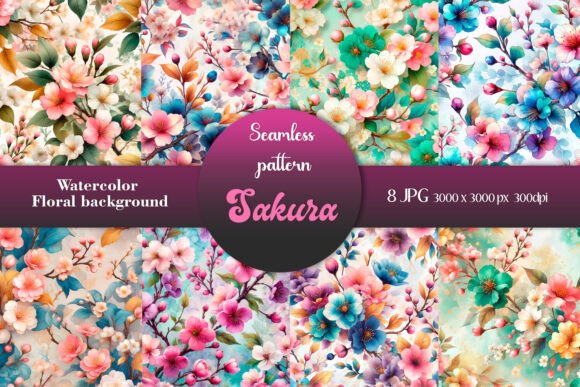
The Sakura Seamless Pattern Watercolor is a digital seamless pattern featuring delicate, hand-painted spring sakura blossoms. Designed with care and precision, this watercolor-style background is ideal for a wide range of creative uses such as textile printing, fabric design, wrapping paper, gift wrap, bags, wallpaper, covers, scrapbooking, greeting cards, promotional cards, planners, wedding invitations, and more. Its high-resolution format (3000x3000 px, 300dpi) ensures crisp, clear prints on any material, making it a valuable resource for both hobbyists and professionals.
Why Choose Sakura Seamless Pattern Watercolor?
This pattern stands out due to its soft, artistic feel that evokes the beauty of springtime. The seamless nature of the design allows it to tile perfectly without visible seams or repetition issues, which is essential when creating larger compositions. Whether you're designing a fabric print for a fashion project or crafting personalized stationery for a special event, the Sakura Seamless Pattern Watercolor adds an elegant, natural touch.
Its versatility makes it suitable for fantasy-themed projects as well as realistic portrayals of spring landscapes. The file comes in a .zip format, containing eight different seamless patterns, giving users options to match their specific aesthetic needs. This collection is perfect for those looking to infuse their work with seasonal charm or Japanese-inspired motifs.
Common Mistakes When Using Seamless Patterns
Many designers overlook key details when working with seamless patterns like the Sakura Seamless Pattern Watercolor. Here are some common pitfalls and how to avoid them:
- Ignoring Resolution Requirements: High-quality prints demand high-resolution files. While the Sakura pattern provides 300dpi at 3000x3000 px, using it in lower resolution formats can compromise clarity. Always verify your printer's specifications before finalizing your layout.
- Not Testing the Tiling: Just because a pattern claims to be "seamless" doesn't always mean it works perfectly in every software or across all surfaces. Test tiling in your design tool first to ensure there are no visual gaps or misalignments.
- Mismatching Color Modes: Digital designs often use RGB, but printed materials require CMYK. If you're preparing physical products like greeting cards or fabric, convert the pattern to the correct color mode early in the process to maintain accurate colors.
- Overlooking Licensing Terms: Some seamless patterns come with restrictions regarding commercial use. Make sure to review the license agreement to understand if you can use these images for selling products or large-scale marketing efforts.
How These Mistakes Can Impact Your Work
Using a low-resolution version may result in pixelated or blurry prints, especially when scaled up. This can significantly affect the professionalism and quality of your final product. Similarly, improper tiling might lead to distracting lines or inconsistencies in your design—something particularly noticeable in fabric or wallpaper applications.
Color mismatches between digital previews and physical outputs can also lead to customer dissatisfaction. For entrepreneurs or marketers using these patterns for branding or packaging, accuracy is crucial. Ignoring licensing terms could even expose you to legal risks if the pattern isn’t cleared for commercial usage.
Better Practices for Maximum Usability
To get the most out of your Sakura Seamless Pattern Watercolor, consider the following best practices:
- Use the Right Software: Adobe Photoshop, Illustrator, or Inkscape are excellent tools for editing and applying seamless patterns. These programs allow precise control over tiling, scaling, and layering.
- Test Print Before Finalizing: Especially if you're using the pattern for physical products, do a small test print to check alignment, color fidelity, and overall appearance.
- Customize Thoughtfully: Don’t just apply the pattern as-is. Try overlaying it with subtle textures, adjusting brightness/contrast, or combining it with other elements to create a unique look tailored to your project’s theme.
- Optimize File Sizes: While high resolution is important, excessively large files can slow down workflow. Save optimized versions for web use and keep the original high-res for printing.
Real-World Examples of Use
Imagine you’re a small business owner creating custom tote bags for a spring sale. By applying the Sakura Seamless Pattern Watercolor, you give each bag a fresh, floral appeal that resonates with customers during the season. But if you neglect to check the tiling settings in your design software, the repeated pattern might show unwanted breaks, making the design appear unprofessional.
Or perhaps you're a wedding planner designing invitations. The soft hues and graceful petals of the Sakura pattern provide a dreamy backdrop. However, if you don’t convert the image to CMYK before sending it to the printer, the actual printed color might not match the digital preview, potentially altering the mood of the entire suite.
What to Check Before Making a Decision
Before downloading or purchasing the Sakura Seamless Pattern Watercolor, ask yourself the following questions:
- Do I need the pattern for digital or print use? Each requires different handling.
- Will I be using it commercially or just for personal projects? Review the license carefully.
- What size will my final output be? Ensure the pattern scales appropriately without distortion.
- Does the style align with the theme of my project? Not all watercolor patterns suit every design context.
These considerations help you make informed choices and prevent unnecessary rework or wasted resources later in the creative process.
Alternatives and Comparisons
If you're new to seamless patterns or unsure whether this one fits your needs, consider comparing it with similar floral or botanical seamless backgrounds. Look for features like:
- Seamlessness in different orientations (horizontal and vertical)
- Compatibility with your design software
- Resolution and file format flexibility
- License permissions for intended use
Getting Started with Your Download
After downloading the Sakura Seamless Pattern Watercolor, you’ll receive a zip file with eight JPG seamless patterns. Extract the files and open them in your preferred design software. From there, you can tile the pattern onto a canvas, adjust colors, add overlays, or combine it with text for greeting cards and invitations.
If you're using it for fabric or wallpaper, remember to simulate how it looks when tiled repeatedly. You can do this by setting the pattern as a fill and expanding it across a larger workspace. Once satisfied, export your design in the appropriate format for your printer or production partner.
Tips for Efficient Workflow
Here are a few tips to streamline your use of the Sakura Seamless Pattern Watercolor:
- Create a library of saved patterns in your design software for quick access.
- Use layer masks instead of erasing parts of the pattern to preserve quality and flexibility.
- Experiment with blending modes to achieve a softer or more vibrant effect depending on your project.
- Keep backups of the original files so you can start fresh if needed.
Final Thoughts on Creative Satisfaction
Choosing the right seamless pattern can elevate your design from good to exceptional. The Sakura Seamless Pattern Watercolor offers a beautiful, flexible option for creators aiming to bring a touch of spring into their work. With careful application and attention to detail, you can avoid common mistakes and enjoy a smooth, satisfying creative experience.
Whether you're a blogger adding flair to printable worksheets or an entrepreneur launching a line of eco-friendly packaging, this pattern is a great investment. Remember to plan ahead, test thoroughly, and respect the licensing guidelines to ensure your project looks great and stays within legal boundaries.
Happy creative work! Thanks for visiting me—and may your next design project bloom with inspiration and success.