Sunhat Garden Digital Paper: A Timeless Addition to Your Creative Workflow
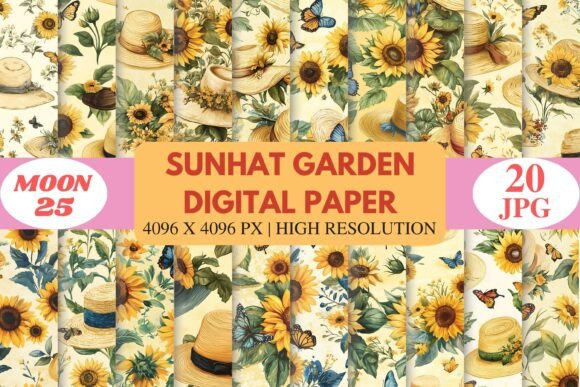
For creators, entrepreneurs, and hobbyists alike, finding the right design elements can be a game-changer. Sunhat Garden Digital Paper offers a unique and elegant solution for those looking to infuse warmth and charm into their digital or print projects. This collection brings together hand-painted sunflowers, straw sunhats, delicate butterflies, leafy florals, and vintage-inspired tones in high-resolution seamless patterns. Whether you're working on scrapbooking, branding, invitations, or print-on-demand products, this digital paper pack is designed to streamline your creative process while elevating the final outcome.
Understanding the Role of Digital Papers in Design
Digital papers serve as foundational assets in many creative workflows. They provide backgrounds that set the tone for designs, helping to unify visual elements and guide the viewer's attention. In the case of Sunhat Garden Digital Paper, these assets are crafted with both aesthetics and functionality in mind. The warm color palette and romantic motifs make them ideal for themes like cottage-style interiors, botanical illustrations, and seasonal crafts.
Before diving into any project—whether it’s designing a planner page or creating packaging for a small business—it's important to consider how digital papers will support your vision. These papers can act as a starting point, helping you establish a mood board or theme quickly. Their seamless nature means they won’t disrupt the flow of your layout when tiled, making them especially useful for large-format prints or intricate digital collages.
Preparation and Integration Tips
- Organize your files: Start by downloading the 20 JPG files included in the Sunhat Garden pack. Store them in a dedicated folder labeled by project type (e.g., “Wedding Invitations” or “Farmhouse Wall Art”) to maintain clarity and ease of access.
- Choose the right platform: The pack is compatible with major design tools such as Photoshop, Canva, Procreate, Illustrator, Affinity Designer, Cricut Design Space, and Silhouette Studio. Select one that aligns with your workflow and familiarity level.
- Plan your use cases: Think about where each pattern might best fit. For example, bold sunflower designs could work well for eye-catching social media posts, while softer butterfly motifs may suit greeting cards or stationery.
Using Sunhat Garden Digital Paper During the Creative Process
Once integrated into your workspace, these digital papers become more than just background elements—they evolve into essential components of your design strategy. When crafting a scrapbook layout, using a subtle floral texture as a base allows other embellishments to stand out without competing visually. Similarly, when designing for a brand with a rustic or vintage identity, these papers help reinforce the desired aesthetic consistently across multiple touchpoints.
During the planning phase of a project, consider how the digital paper interacts with typography, photography, and graphic elements. The soft vintage tones in the Sunhat Garden collection pair beautifully with handwritten fonts and muted palettes, creating a cohesive look that feels intentional and polished. It's also worth noting that the high resolution (4096 × 4096 pixels) ensures that these patterns remain crisp and professional whether viewed on screen or printed at scale.
Workflow Example: Designing a Wedding Invitation Suite
- Define the theme: Choose a romantic, countryside wedding theme. Sunhat Garden’s sunflowers and butterflies are perfect for capturing this vibe.
- Select a base paper: Use one of the digital paper backgrounds as the foundation for the invitation card, RSVP, and envelope liner.
- Layer with text and imagery: Add custom typography and photos of the venue or couple. The hand-painted style of the paper complements organic visuals seamlessly.
- Export and print: Since the papers are print-ready, export your designs in CMYK format and send them to a quality printer. No need for extra adjustments if you’ve used compatible colors and resolutions.
Post-Project Applications and Long-Term Use
After completing a specific project, don't let the Sunhat Garden Digital Paper go unused. These versatile assets can be repurposed across various platforms. For instance, a pattern used in a journal layout can later appear as a subtle background in a blog post or website banner. This helps maintain brand consistency or personal style across different formats.
If you're an entrepreneur or small business owner in the lifestyle or craft niche, consider how these patterns can support product development. They’re fully compatible with sublimation and print-on-demand workflows, allowing you to create custom stickers, planners, or even fabric prints. By keeping a few key designs from the pack in rotation, you can ensure your product line remains fresh yet familiar to customers.
Staying Efficient and Consistent
- Create templates: Build reusable design templates using the digital papers. This speeds up future projects and maintains uniformity in branding or content styles.
- Batch process designs: If you're preparing multiple items for a single event or campaign, apply the same paper across all materials to keep things cohesive.
- Archive unused patterns: Not every pattern needs to be used immediately. Keep a catalog of what’s available so you can revisit them when inspiration strikes again.
Compatibility and Practical Implementation
The beauty of Sunhat Garden Digital Paper lies in its broad compatibility. Whether you're using Adobe Illustrator for vector-based branding or Canva for quick social media graphics, the patterns adapt well. For users who prefer mobile editing, Procreate makes it easy to incorporate these papers into hand-drawn layouts, blending digital and analog techniques effortlessly.
In terms of usability, the seamless tiling feature is a standout. This eliminates the need for manual adjustments when scaling up or repeating the pattern. However, it's still good practice to test how a pattern looks when applied to different sizes or shapes. For example, using it as a background for a circular sticker versus a rectangular poster can yield very different results.
When working with tools like Cricut or Silhouette, ensure that the pattern has been converted correctly to match the tool's requirements. While the JPG format is widely supported, some platforms may benefit from additional formatting or layering steps. Always check the software documentation for optimal file handling practices.
Quality Control and File Management
- Check for clarity: Zoom in on your design preview to confirm that the pattern remains sharp and detailed at the intended size.
- Optimize file names: Rename the downloaded papers to reflect their contents or potential uses (e.g., "Sunflower_Background_01" or "Butterfly_Texture_02") for easier navigation.
- Backup your assets: Save copies of the original files in cloud storage or an external drive to avoid losing access due to technical issues or accidental deletions.
Enhancing Productivity with Digital Papers
Time is a valuable resource for professionals and creatives juggling multiple tasks. Using pre-made digital papers like Sunhat Garden can significantly reduce the time spent on background creation. Instead of generating textures from scratch or sourcing royalty-free images, you can focus on refining the layout and messaging of your project.
For educators or bloggers who regularly produce content, these papers offer a consistent backdrop for printable resources, worksheets, or guides. Pairing them with clean, readable fonts and minimalistic layouts ensures that the information presented remains the focal point, while the paper adds a touch of personality and professionalism.
Real-World Scenarios
- Freelance Graphic Designer: Include Sunhat Garden patterns in client proposals for branding packages that include stationery, packaging, or web headers. Showcase the versatility of the collection to demonstrate value.
- Small Business Owner: Apply the digital papers to product labels, gift tags, or packaging for a boutique offering. This enhances perceived quality and supports a cohesive brand identity.
- Hobbyist Scrapbooker: Use the patterns to create themed pages for family events, travel memories, or seasonal collections. Their timeless feel ensures they'll remain relevant for years to come.
Final Thoughts on Seamless Creativity
Sunhat Garden Digital Paper isn't just another decorative asset—it's a strategic tool that supports creativity, efficiency, and quality in design processes. From initial brainstorming to final production, these patterns offer flexibility and charm that can enhance both personal and professional projects. As you explore the 20 files included in the pack, think beyond immediate applications. How might these designs support long-term goals, recurring campaigns, or evolving brand identities?
By integrating these papers into your existing tools and workflows, you unlock new possibilities for expression and execution. Whether you're a seasoned designer or someone just beginning to experiment with digital art, Sunhat Garden provides a solid foundation for bringing ideas to life with elegance and ease.